
Available since DingPOS v2.0
What's the difference between Revenue and Cash Received?
Revenue counts on the day the goods were handed over, after every discount and before tax; Cash Received counts on the day the money came in, and is the money you took, tax included. In a store that charges tax, Cash Received runs higher than Revenue by the tax, even for orders paid at the counter. Both appear as the first two tiles in the first row of Stats, alongside Gross profit, Orders, and Avg Order.
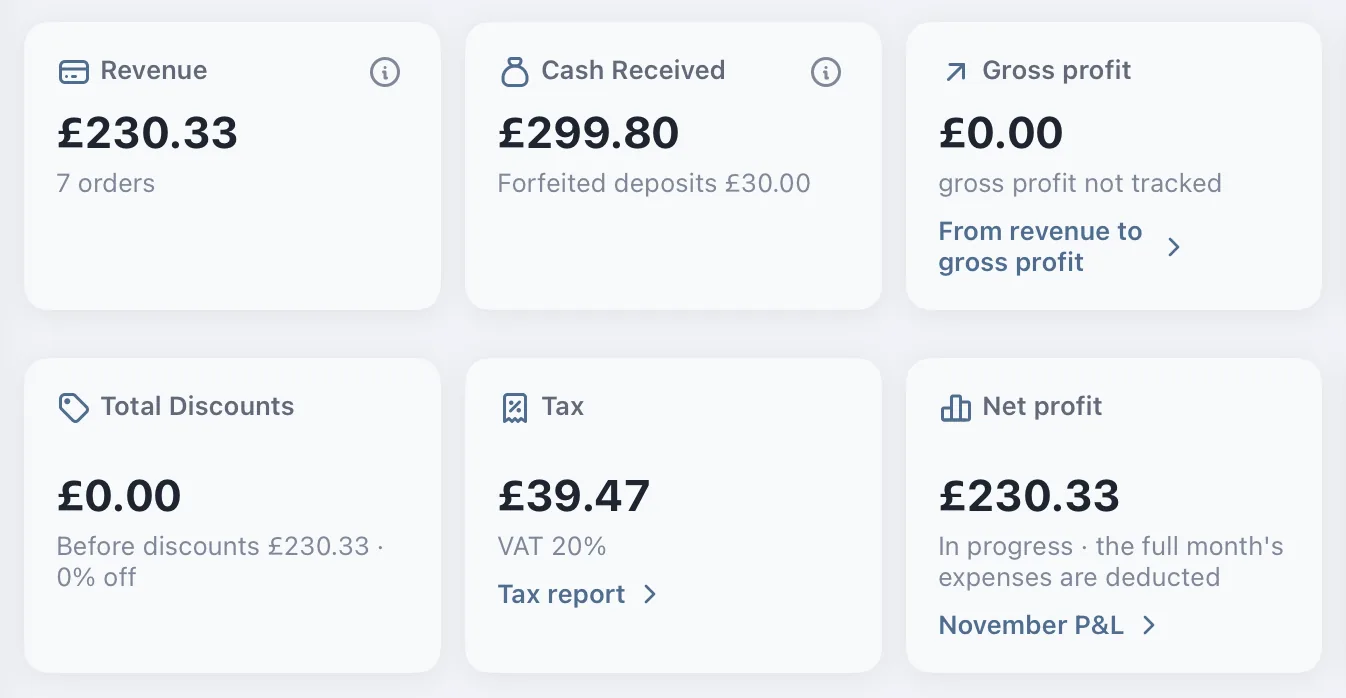
When Revenue and Cash Received differ
For example, when a tax-inclusive store sells NT$1,050 including 5% tax and the customer pays at the counter, Revenue is NT$1,000 and Cash Received is NT$1,050. Beyond tax, the two figures split apart in these situations:
- On account: the goods leave today and count toward today's Revenue; the money counts toward Cash Received on the day the order is settled.
- Pre-order: the deposit counts toward Cash Received when it is paid; Revenue is recognized in full on the pickup date.
- Forfeited deposits: when a customer cancels a pre-order and you keep the deposit, it was already counted in Cash Received when paid. Stats shows it separately as Forfeited deposits, and it never counts as Revenue.
- Voiding an earlier order: the refunded money counts toward Cash Received on the day of the void, so that day's Cash Received can be negative. The voided order itself is counted on its sale date and shown in the subtitle of the Orders tile.
- Cash rounding: any amount that Cash rounding takes in over or under the order total counts in Cash Received, never in Revenue.
When either amount is non-zero, the subtitle of the Cash Received tile shows its Cash rounding or Forfeited deposits.
Tax and tile details
The tax that separates Revenue and Cash Received is listed in From revenue to gross profit, opened from the footer of the Gross profit tile. It shows Revenue (incl. tax), Tax, and Revenue (excl. tax). Stores in Australia, the UK, New Zealand, and Singapore see their local tax name there, such as Revenue (incl. GST), GST, and Revenue (excl. GST).
To see the tax collected for filing, open Tax report from the Tax tile.
The ⓘ icon on the Revenue, Cash Received, and Orders tiles explains these rules in the app, including the voided orders listed in the subtitle of the Orders tile.
Reconciling and reading sales
To reconcile, match Cash Received against your cash drawer and card terminal. The Payment Methods card on Stats shows one row per method, and sales made before you rename a method are counted under the new name. To see how much you sold in a period, read Revenue. Returns reduce Revenue on the day of the return.
Revenue before tax arrived in v3.5, and past periods were recalculated the same way, so a store that charges tax sees lower Revenue than before the update. That is a correction: earlier versions included tax in Revenue, and tax-exclusive stores even counted the sales tax they collected as Revenue.